He oranga ngākau, he pikinga waiora.
Translation: Positive feelings in your heart will raise your sense of self-worth.
Welcome back readers! It has been a while since I last felt like sharing. You know how passionate I am about finding creative ways to make learning, identity, and pedagogy visible.
I have taken this year off as a sabbatical for personal reasons. One major focus is on my own personal learning that felt lost in the mundane grind of classroom teaching. I needed some inspiration to recapture my creativity. One way of doing this has been training with Phil Carew from Deploy Learning. This marks my 3rd round of AI Training with the team, and true to form, each time I continue to learn heaps!
This week, our focus was on Nano Banana—an innovative, AI-driven visual design methodology that allows educators to transform abstract personal narratives, values, and professional milestones into highly customized, brand-aligned infographics.
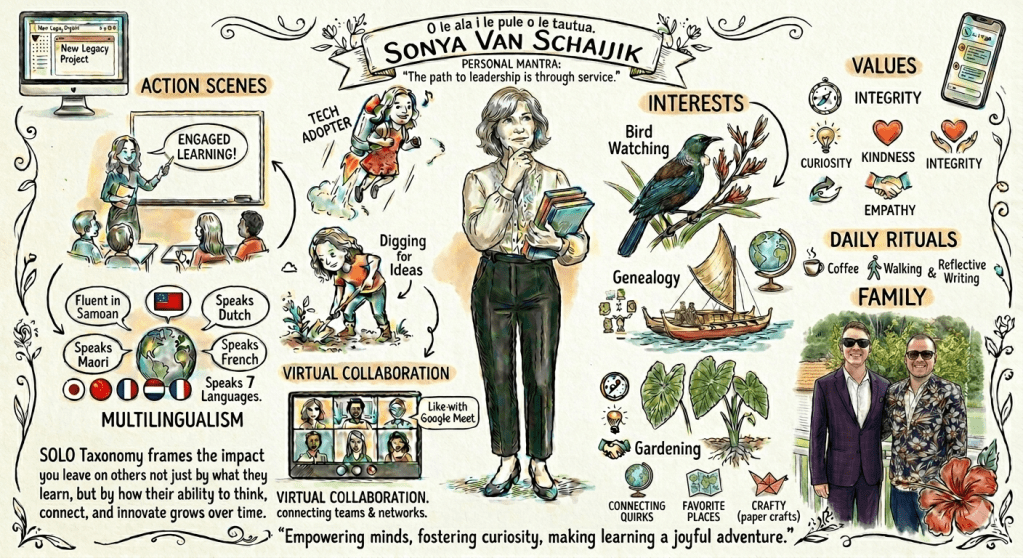
On Linkedin I spotted an infographic created by Lucy Gray and she very kindly shared her prompt. So I used her prompt to build a rich, hand-drawn style visual biography that captures who I am: a teacher, a speaker of multiple languages, an artist of paper crafts, and an educator deeply rooted in both my Samoan heritage and the framework of SOLO Taxonomy. However, beautiful, authentic design rarely happens on the first try. It is an evolutionary process.
Below is the behind-the-scenes look at how my personal infographic evolved through 14 distinct rounds of iterative prompting.
The Creative Journey: 14 Steps to Visual Clarity
Phase 1: Laying the Foundation & Honouring Heritage
- Prompt 1 (Inspiration credit): The concept began with a sketch-note style page. Warm, human, and slightly whimsical, it called for ink pencil lines, subtle watercolor accents, doodle icons, a full-body portrait, and a thoughtful headshot.
- Prompt 2: This step was all about authenticity. I swapped generic elements for personal realities: changing a dress to trousers and a top, adjusting my hair to short and wavy, removing “singing” to make room for my actual languages, and changing “quirky” to crafty to reflect my love for paper craft.
Phase 2: Cultural Grounding & Tech Upgrades
- Prompt 3: Language and core beliefs came to the forefront. I introduced my fundamental leadership mantra, grounded by the beautiful Samoan proverb:“O le ala i le pule o le tautua.” (The path to leadership is through service.)
- Prompt 4: Time to modernise the digital classroom toolkit. I swapped out Zoom for Google Meet, deleted an old-fashioned webcam icon, and expanded my multilingual profile to highlight fluency in Samoan and English, alongside speaking Māori, Dutch, and French (with flag circles representing Japanese and Chinese).
- Prompt 6: To give the layout a softer feel, I added a wavy fringe to my portraits and placed a hand-drawn hibiscus flower in the bottom right corner to anchor the page in Pacific beauty.
Phase 3: Defining Values & Visual Legacy
- Prompt 5: A crucial update to my Legacy Statement to ensure it aligned perfectly with my educational philosophy:“SOLO Taxonomy frames the impact you leave on others not just by what they learn, but by how their ability to think, connect, and innovate grows over time.”
- Prompts 7 – 11: We restructured the sections, changing “Interests” to Values and bringing back my thinking headshot. To visually represent these deep personal values, we added three distinct, beautifully drawn elements:
- Bird watching: Represented by a native New Zealand Tūī.
- Genealogy: Honoured by a Samoan two-hulled voyaging canoe. THere are stories of my great grandmother travelling on these.
- Gardening: Visualized through a thriving Taro plant. Yes I have an amazing Taro patch so that I can cook up palusami when I have a craving for home.
- Daily Rituals: Updated to feature a grounding daily walk. This is to recapture health and wellbeing that can also get pushed aside in my professional life.
Phase 4: Family & The Final Polish
- Prompt 12 & 13: For the personal touch, I dedicated space to my Family by adding a custom illustration of my boys. To balance the composition, the value images were made smaller, and the entire infographic was re-rendered to be sharper, clearer, and crisp.
- Prompt 14: The final, vital editorial sweep—correcting text to ensure “Fluent in Samoan” was spelled flawlessly and “Speaks French” carried its proper capitalization.
Co-Authoring the Narrative: Partnering with Gemini Chat
Another invaluable lesson from Phil’s training is that the power of AI isn’t confined to a single tool; it’s about creating a workflow where different AI models support one another. To synthesise this learning journey into the cohesive blog post. I partnered with Gemini Chat.
Guided by Phil’s strategies on effective text generation and structuring, I fed my raw, 14-step prompting history from the file named Prompt for Personal Infographic. directly into Gemini Chat.
Instead of manually organising my notes, I used Gemini as a collaborative co-author to:
- Categorize and Chronologize: Group my chaotic text prompts into logical design “phases” (Heritage, Tech, Values, Polish).
- Maintain Voice: Ensure the tone remained professional, reflective, and uniquely mine.
This co-authored process mirrored the Nano Banana experience—iterating on a script until the output matched my exact intent.
My Reflections on the Process
Stepping back and looking at the final piece, the iterative workflow of Nano Banana really highlighted the power of fine-tuning AI to get to the heart of what matters.
- What Worked Beautifully: I love the final full-body portrait combined with the thoughtful headshot. The custom illustrations chosen for my values—the Tūī, the voyaging canoe, and the taro plant—turned out perfectly and resonated deeply with my heritage story.
- What I’d Change Next Time: In hindsight, I still would have preferred the value/interest images to be a little smaller to give the layout more breathing room. Knowing about the Sketch feature now, I would definitely use it to circle those specific icons and visually guide the resizing process! I also realized that while I swapped it out for walking, I would have loved to keep “Connecting with Students” somewhere in my daily rituals, as that connection is the pumanawatanga (heartbeat) of my teaching day.
Final Thoughts
Training with Phil Carew and Deploy Learning is always a masterclass in pushing the boundaries of what is possible in educational tech. Combining Nano Banana for visual storytelling with Gemini Chat for narrative synthesis proved that modern prompting isn’t just about typing instructions—it’s an ongoing, reflective dialogue that forces you to think deeply about how you want to share your legacy and identity with the world.
For further information on training, visit Deploy Training